QuestPDF 2025.12.0-alpha1
QuestPDF - Modern PDF library for C# developers
Generate and manipulate PDF documents in your .NET applications using the open-source QuestPDF library and its C# Fluent API.




Quick Start
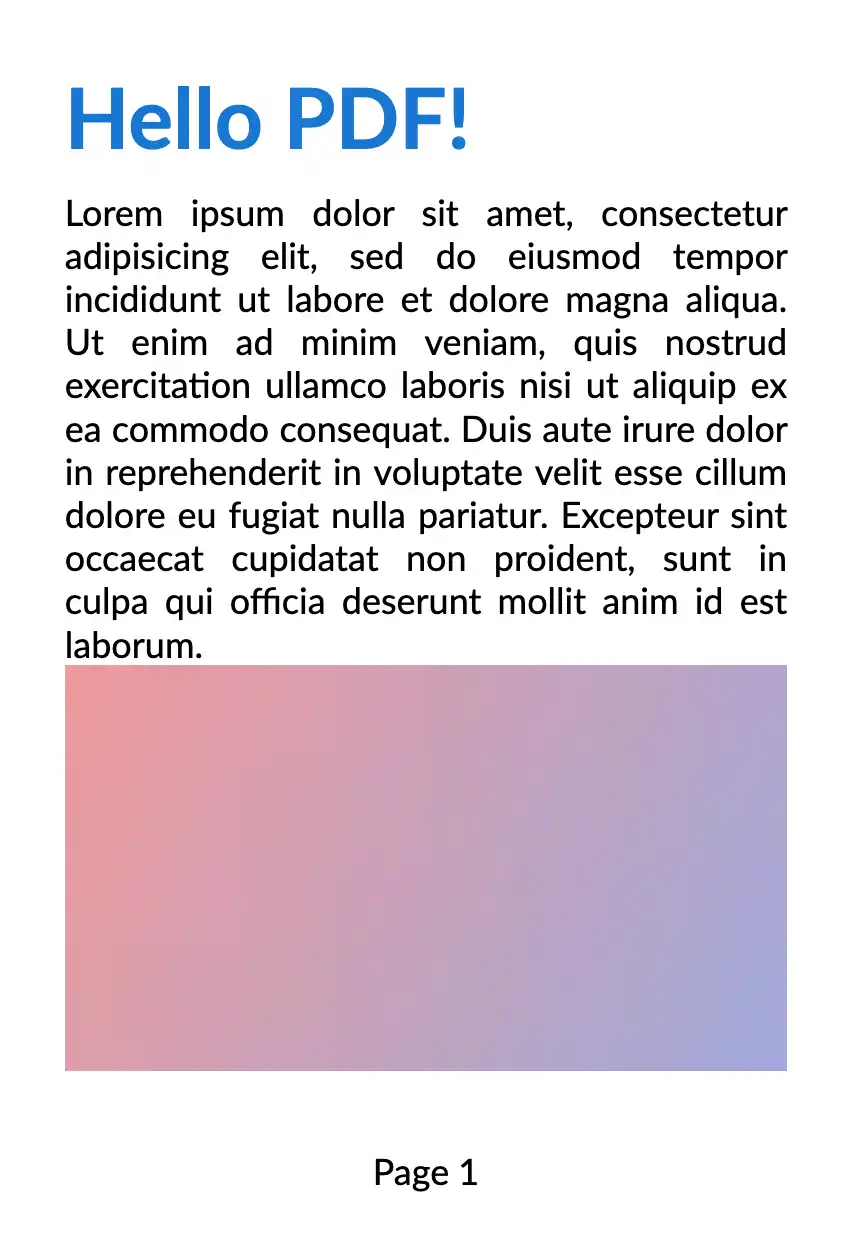
Learn how easy it is to design, implement and generate PDF documents using QuestPDF. Effortlessly create documents of all types such as invoices and reports.

using QuestPDF.Fluent;
using QuestPDF.Helpers;
using QuestPDF.Infrastructure;

// code in your main method
Document.Create(container =>
{
    container.Page(page =>
    {
        page.Size(PageSizes.A4);
        page.Margin(2, Unit.Centimetre);
        page.Background(Colors.White);
        page.DefaultTextStyle(x => x.FontSize(20));

        page.Header()
            .Text("Hello PDF!")
            .SemiBold().FontSize(36).FontColor(Colors.Blue.Medium);

        page.Content()
            .PaddingVertical(1, Unit.Centimetre)
            .Column(x =>
            {
                x.Spacing(20);

                x.Item().Text(Placeholders.LoremIpsum());
                x.Item().Image(Placeholders.Image(200, 100));
            });

        page.Footer()
            .AlignCenter()
            .Text(x =>
            {
                x.Span("Page ");
                x.CurrentPageNumber();
            });
    });
})
.GeneratePdf("hello.pdf");
Code-Focused Paradigm
Modular and Maintainable C# Code
Implement modular PDF layouts with reusable well-organized classes and methods. Refactor safely with IntelliSense - your logic stays seamlessly integrated with your domain code.
Familiar Programming Concepts
Use conditions, loops, LINQ, and extension methods to effortlessly generate dynamic, data-driven PDF documents tailored to your unique business needs.
Git-Friendly Workflow
Enjoy straightforward C# code reviews, meaningful pull-request diffs, and cleaner version control histories.
.Column(column =>
{
    if (Model.Comments != null)
        column.Item().Text(Model.Comments);

    foreach(var item in Model.Items)
       column.Item().Element(c => CreateItem(c, item);
});
void CreateItem(IContainer container, Item item)
{
    container
-       .Background(Colors.Grey.Lighten2)
+       .Background(item.Color)
        .Padding(10)
        .Text(item.Text);
}
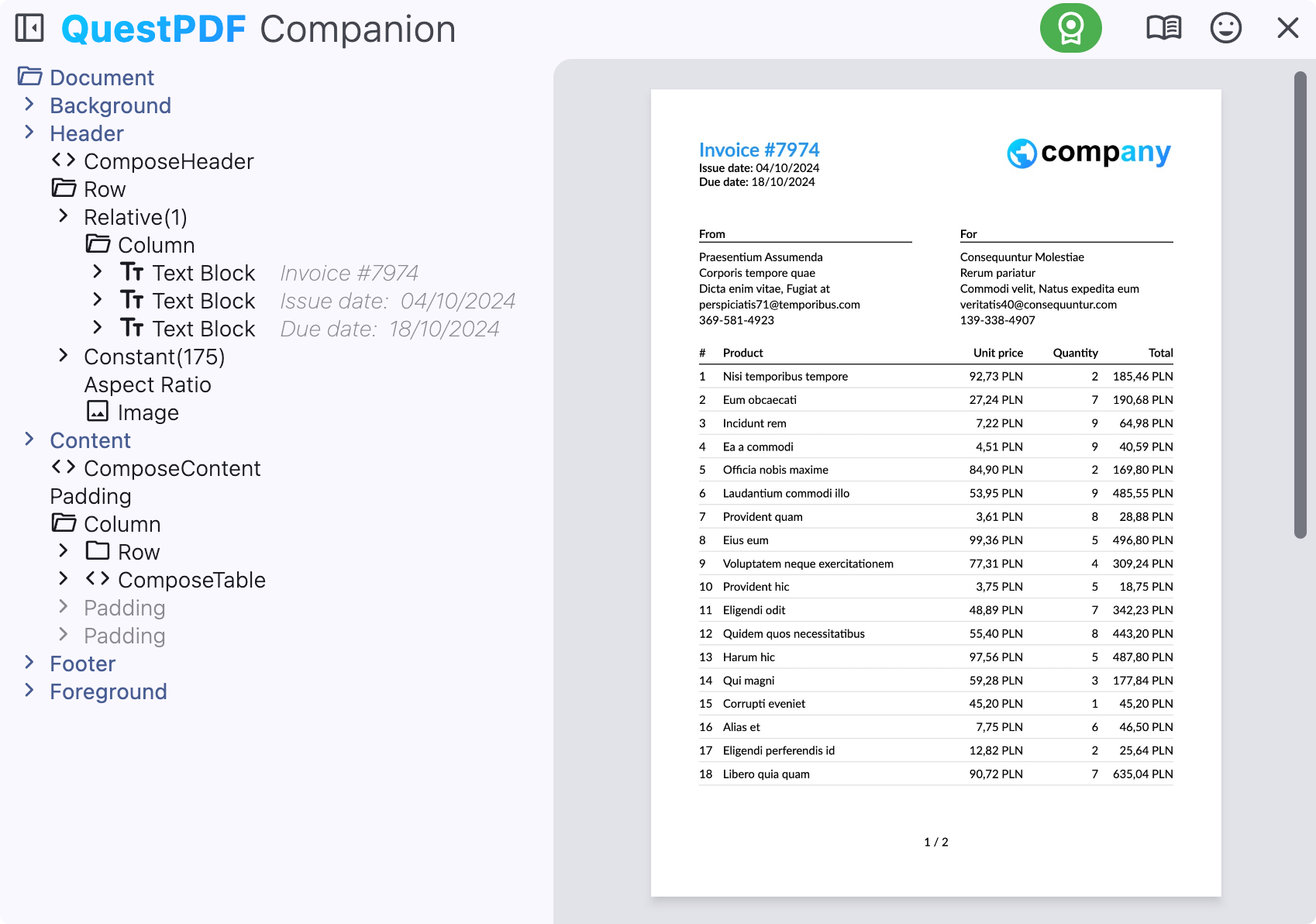
Companion App
Accelerate your development with live document preview powered by the hot-reload capability, eliminating the need for C# code recompilation.
- Explore PDF document structure and hierarchy
- Quickly magnify and measure content
- Debug runtime exceptions with stack traces and code snippets
- Identify, understand and solve layout errors

Exactly what you need
Comprehensive Layout Engine
A powerful layout engine built specifically for PDF generation. Gain full control over document structure, precise content positioning, and automatic pagination for complex reports and invoices.
Rich Toolkit
Accelerate your PDF development workflow with a rich set of reusable components and over 50 layout elements. Easily implement data-driven documents using a Fluent C# API.
High Performance
Generate PDF files at scale with up to thousands of pages per second - while maintaining minimal CPU and memory usage. Perfect for high-throughput .NET applications.
Advanced Language Support
Create multilingual PDF documents with full support for right-to-left (RTL) languages, advanced text shaping, and bi-directional layout handling.
Perform common PDF operations
Leverage a powerful C# Fluent API to create, customize, and manage your PDF documents with ease.
- Merge documents
- Attach files
- Extract pages
- Encrypt / decrypt
- Extend metadata – Limit access
- Optimize for Web
- Overlay / underlay
DocumentOperation
    .LoadFile("input.pdf")
    .TakePages("1-10")
    .MergeFile("appendix.pdf", "1-z") // all pages
    .AddAttachment(new DocumentAttachment
    {
        FilePath = "metadata.xml"
    })
    .Encrypt(new Encryption256Bit
    {
        OwnerPassword = "mypassword",
        AllowPrinting = true,
        AllowContentExtraction = false
    })
    .Save("final-document.pdf");
Multiplatform
Supports all major operating systems and works seamlessly with leading IDEs, cloud platforms, and modern development tools.
Technologies: modern dotnet, legacy .NET Framework, DockerOperating systems: Windows, Linux, MacOSCloud providers: Azure, AWS, Google CloudIDE: Visual Studio, Visual Code, JetBrains Rider, others
Fair and Sustainable License
By offering free access to most users and premium licenses for larger organizations, the project maintains its commitment to excellence:
- Long-term and sustainable development
- Regular feature, performance, quality and security updates
- Active community and enterprise support
Free for individuals, non-profits, and businesses under $1M in annual revenue, as well as all FOSS projects.

Let's get started
Follow our detailed tutorial, and see how easy it is to generate a fully functional invoice with fewer than 250 lines of C# code.


No packages depend on QuestPDF.
.NET 6.0
- No dependencies.
.NET 8.0
- No dependencies.
.NET Standard 2.0
- System.Numerics.Vectors (>= 4.5.0)
| Version | Downloads | Last updated |
|---|---|---|
| 2026.7.3 | 0 | 08/12/2026 |
| 2026.7.2 | 0 | 07/29/2026 |
| 2026.7.1 | 6 | 07/23/2026 |
| 2026.7.0 | 9 | 07/23/2026 |
| 2026.6.1 | 3 | 07/23/2026 |
| 2026.6.0 | 3 | 06/18/2026 |
| 2026.5.0 | 6 | 05/16/2026 |
| 2026.2.4 | 14 | 03/22/2026 |
| 2026.2.3 | 8 | 03/07/2026 |
| 2026.2.3-alpha | 11 | 03/07/2026 |
| 2026.2.2 | 19 | 02/28/2026 |
| 2026.2.1 | 9 | 02/18/2026 |
| 2026.2.0 | 8 | 02/18/2026 |
| 2025.12.4 | 13 | 02/07/2026 |
| 2025.12.3.1-alpha2 | 13 | 01/21/2026 |
| 2025.12.3.1-alpha | 14 | 01/21/2026 |
| 2025.12.3 | 17 | 01/16/2026 |
| 2025.12.2 | 16 | 01/14/2026 |
| 2025.12.1 | 20 | 12/27/2025 |
| 2025.12.0 | 14 | 12/14/2025 |
| 2025.12.0-alpha4 | 19 | 11/09/2025 |
| 2025.12.0-alpha3 | 15 | 11/04/2025 |
| 2025.12.0-alpha2 | 15 | 10/10/2025 |
| 2025.12.0-alpha1 | 14 | 09/27/2025 |
| 2025.12.0-alpha0 | 22 | 09/10/2025 |
| 2025.7.4 | 13 | 11/04/2025 |
| 2025.7.3 | 18 | 10/25/2025 |
| 2025.7.2 | 15 | 09/27/2025 |
| 2025.7.1 | 19 | 09/11/2025 |
| 2025.7.0 | 23 | 07/12/2025 |
| 2025.6.0-rc0 | 17 | 06/27/2025 |
| 2025.5.1 | 24 | 06/09/2025 |
| 2025.5.0 | 22 | 05/30/2025 |
| 2025.4.4 | 25 | 06/04/2025 |
| 2025.4.3 | 21 | 06/04/2025 |
| 2025.4.2 | 20 | 06/04/2025 |
| 2025.4.1 | 19 | 06/05/2025 |
| 2025.4.0 | 25 | 06/04/2025 |
| 2025.1.7 | 29 | 06/05/2025 |
| 2025.1.6 | 22 | 06/05/2025 |
| 2025.1.5 | 25 | 06/04/2025 |
| 2025.1.4 | 20 | 06/05/2025 |
| 2025.1.3 | 20 | 06/04/2025 |
| 2025.1.2 | 24 | 06/04/2025 |
| 2025.1.1 | 22 | 06/04/2025 |
| 2025.1.0 | 21 | 06/04/2025 |
| 2025.1.0-rc0 | 17 | 06/09/2025 |
| 2025.1.0-alpha0 | 16 | 06/09/2025 |
| 2024.12.3 | 26 | 06/04/2025 |
| 2024.12.2 | 24 | 06/04/2025 |
| 2024.12.1 | 21 | 06/04/2025 |
| 2024.12.0 | 20 | 06/04/2025 |
| 2024.12.0-rc3 | 17 | 06/07/2025 |
| 2024.12.0-rc2 | 22 | 06/06/2025 |
| 2024.12.0-rc1 | 19 | 06/07/2025 |
| 2024.12.0-rc0 | 23 | 06/06/2025 |
| 2024.10.4 | 23 | 06/04/2025 |
| 2024.10.3 | 22 | 06/04/2025 |
| 2024.10.2 | 23 | 06/04/2025 |
| 2024.10.1 | 24 | 06/04/2025 |
| 2024.10.0 | 26 | 06/04/2025 |
| 2024.10.0-rc4 | 22 | 06/07/2025 |
| 2024.10.0-rc3 | 17 | 06/07/2025 |
| 2024.10.0-rc2 | 18 | 06/06/2025 |
| 2024.10.0-rc1 | 20 | 06/07/2025 |
| 2024.10.0-rc0 | 20 | 06/04/2025 |
| 2024.7.3 | 20 | 06/04/2025 |
| 2024.7.2 | 25 | 06/04/2025 |
| 2024.7.1 | 24 | 06/05/2025 |
| 2024.7.0 | 23 | 06/04/2025 |
| 2024.7.0-rc0 | 18 | 06/10/2025 |
| 2024.6.4 | 23 | 06/04/2025 |
| 2024.6.3 | 21 | 06/04/2025 |
| 2024.6.2 | 21 | 06/04/2025 |
| 2024.6.1 | 20 | 06/05/2025 |
| 2024.6.0 | 22 | 06/04/2025 |
| 2024.3.10 | 21 | 06/04/2025 |
| 2024.3.9 | 20 | 06/04/2025 |
| 2024.3.8 | 21 | 06/04/2025 |
| 2024.3.7 | 23 | 06/04/2025 |
| 2024.3.6 | 20 | 06/04/2025 |
| 2024.3.5 | 22 | 06/04/2025 |
| 2024.3.4 | 22 | 06/04/2025 |
| 2024.3.3 | 24 | 06/04/2025 |
| 2024.3.2 | 26 | 06/04/2025 |
| 2024.3.1 | 28 | 06/04/2025 |
| 2024.3.0 | 23 | 06/04/2025 |
| 2024.3.0-rc2 | 15 | 06/09/2025 |
| 2024.3.0-rc1 | 17 | 06/09/2025 |
| 2024.3.0-rc | 21 | 06/07/2025 |
| 2024.3.0-beta1 | 20 | 06/11/2025 |
| 2024.3.0-beta | 21 | 06/09/2025 |
| 2024.3.0-alpha | 21 | 06/09/2025 |
| 2023.12.6 | 27 | 06/04/2025 |
| 2023.12.5 | 23 | 06/04/2025 |
| 2023.12.4 | 24 | 06/04/2025 |
| 2023.12.3 | 23 | 06/04/2025 |
| 2023.12.2 | 24 | 06/04/2025 |
| 2023.12.1 | 23 | 06/04/2025 |
| 2023.12.0 | 22 | 06/04/2025 |
| 2023.10.2 | 21 | 06/04/2025 |
| 2023.10.1 | 24 | 06/04/2025 |
| 2023.10.0 | 21 | 06/04/2025 |
| 2023.10.0-alpha0 | 18 | 06/14/2025 |
| 2023.9.1 | 23 | 06/04/2025 |
| 2023.9.0 | 21 | 06/04/2025 |
| 2023.6.3 | 26 | 06/04/2025 |
| 2023.6.2 | 18 | 06/04/2025 |
| 2023.6.1 | 20 | 06/04/2025 |
| 2023.6.0 | 26 | 06/04/2025 |
| 2023.5.3 | 19 | 06/04/2025 |
| 2023.5.2 | 19 | 06/04/2025 |
| 2023.5.1 | 22 | 06/04/2025 |
| 2023.5.0 | 20 | 06/04/2025 |
| 2023.4.2 | 23 | 06/04/2025 |
| 2023.4.1 | 21 | 06/04/2025 |
| 2023.4.0 | 25 | 06/04/2025 |
| 2022.12.15 | 23 | 06/04/2025 |
| 2022.12.14 | 21 | 06/04/2025 |
| 2022.12.13 | 21 | 06/04/2025 |
| 2022.12.12 | 23 | 06/04/2025 |
| 2022.12.11 | 20 | 06/04/2025 |
| 2022.12.10 | 20 | 06/04/2025 |
| 2022.12.9 | 24 | 06/04/2025 |
| 2022.12.8 | 21 | 06/04/2025 |
| 2022.12.7 | 21 | 06/04/2025 |
| 2022.12.6 | 22 | 06/04/2025 |
| 2022.12.5 | 20 | 06/04/2025 |
| 2022.12.4 | 21 | 06/04/2025 |
| 2022.12.3 | 25 | 06/04/2025 |
| 2022.12.2 | 21 | 06/04/2025 |
| 2022.12.1 | 26 | 06/04/2025 |
| 2022.12.0 | 20 | 06/04/2025 |
| 2022.11.0 | 24 | 06/04/2025 |
| 2022.11.0-alpha1 | 22 | 06/09/2025 |
| 2022.11.0-alpha0 | 17 | 06/09/2025 |
| 2022.9.1 | 21 | 06/04/2025 |
| 2022.9.0 | 24 | 06/04/2025 |
| 2022.9.0-alpha1 | 16 | 06/09/2025 |
| 2022.8.2 | 19 | 06/04/2025 |
| 2022.8.1 | 24 | 06/04/2025 |
| 2022.8.0 | 21 | 06/04/2025 |
| 2022.6.3 | 21 | 06/04/2025 |
| 2022.6.2 | 20 | 06/04/2025 |
| 2022.6.1 | 23 | 06/04/2025 |
| 2022.6.0 | 20 | 06/04/2025 |
| 2022.6.0-prerelease | 17 | 06/09/2025 |
| 2022.5.0 | 22 | 06/04/2025 |
| 2022.4.1 | 22 | 06/04/2025 |
| 2022.4.0 | 23 | 06/04/2025 |
| 2022.4.0-alpha1 | 17 | 06/09/2025 |
| 2022.4.0-alpha0 | 18 | 06/12/2025 |
| 2022.3.1 | 19 | 06/04/2025 |
| 2022.3.0 | 23 | 06/04/2025 |
| 2022.2.7 | 21 | 06/04/2025 |
| 2022.2.6 | 19 | 06/04/2025 |
| 2022.2.5 | 26 | 06/04/2025 |
| 2022.2.4 | 21 | 06/04/2025 |
| 2022.2.3 | 23 | 06/04/2025 |
| 2022.2.2 | 26 | 06/04/2025 |
| 2022.2.1 | 24 | 06/04/2025 |
| 2022.2.0 | 24 | 06/04/2025 |
| 2022.2.0-beta1 | 20 | 06/09/2025 |
| 2022.1.0 | 28 | 06/04/2025 |
| 2022.1.0-beta5 | 18 | 06/09/2025 |
| 2022.1.0-beta4 | 16 | 06/11/2025 |
| 2022.1.0-beta3 | 17 | 06/09/2025 |
| 2022.1.0-beta2 | 17 | 06/09/2025 |
| 2022.1.0-beta1 | 19 | 06/09/2025 |
| 2022.1.0-beta0 | 17 | 06/09/2025 |
| 2022.1.0-alpha0 | 19 | 06/12/2025 |
| 2021.12.0 | 24 | 06/04/2025 |
| 2021.12.0-alpha1 | 19 | 06/14/2025 |
| 2021.12.0-alpha0 | 25 | 06/09/2025 |
| 2021.11.4 | 24 | 06/04/2025 |
| 2021.11.3 | 20 | 06/04/2025 |
| 2021.11.0-beta3 | 24 | 06/09/2025 |
| 2021.11.0-beta2 | 19 | 06/09/2025 |
| 2021.11.0-beta | 16 | 06/09/2025 |
| 2021.10.1 | 22 | 06/04/2025 |
| 2021.10.0 | 22 | 06/04/2025 |
| 2021.10.0-beta.2 | 19 | 06/09/2025 |
| 2021.10.0-beta | 23 | 06/09/2025 |
| 2021.9.3 | 21 | 06/04/2025 |
| 2021.9.2 | 27 | 06/04/2025 |
| 2021.9.1 | 20 | 06/04/2025 |
| 2021.9.0 | 23 | 06/04/2025 |
| 2021.8.0 | 22 | 06/04/2025 |
| 2021.5.2 | 20 | 06/04/2025 |
| 2021.4.0 | 22 | 06/04/2025 |
| 2021.3.1 | 21 | 06/04/2025 |
| 2021.3.0 | 19 | 06/04/2025 |
| 2021.2.0 | 21 | 06/04/2025 |
| 2021.1.0 | 21 | 06/04/2025 |
| 2020.11.0 | 22 | 06/04/2025 |